Seagate
638
PRODUCT FIND
All Products
Only Current Products
Interface
Capacity
Family/Model
Number
click here to search
Support > Downloads > shared storage*

Maxtor Shared Storage Downloads

End User License Agreement

Download File

File Version: 1.0
File Size: 37056.0 kb
Supported Operating Systems: Mac OS X, Windows 2000, Windows XP Home Edition, Windows XP Professional

Overview:
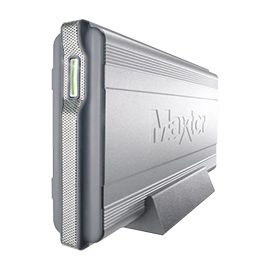
The MSS+_QS_20297801.iso file is an ISO image containing the Maxtor Quick Start installation software used in conjunction with Maxtor Shared Storage Plus drive for supported Windows and Macintosh Operating Systems.

Instructions:

Hardware Prerequisite: An internal or external CD-ROM burner is required for burning the ISO image to a blank CD.

INSTRUCTIONS - Macintosh:

  1. Download the file MSS+_QS_20297801.iso file to your Mac desktop
  2. Double click on the MSS+_QS_20297801.iso image to open and install the Quick Start program.

INSTRUCTIONS - Windows:

  1. Download the file MSS+_QS_20297801.iso file to your Windows desktop
  2. Use a 3rd party program * to burn the MSS+_QS_20297801.iso image to a blank CD.

Installing the Quick Start Software:

Refer to the Shared Storage Plus User’s Guide located on your newly created CD or on Maxtor’s Website for detailed installation procedures and software usage.

Additional Information:

This ISO image file should solely be used for Maxtor Shared Storage Plus Drive.

*The ISO Image must be burned to a CD using a third-party burning software. The following is a list of popular CD Burning Software packages/basic installation procedures:

Gear - www.gearsoftware.com
Gear DVD Standard Edition:

  • Use the "Open external physical image" feature to burn the .ISO to a CD.
  • Refer to the software's documentation for further instructions.

Nero - www.nero.com
Nero Burning ROM:

  • Use the "Burn Image" feature to burn the .ISO image to CD
  • Refer to the software's documentation for further instructions.

Roxio* - www.roxio.com
Easy CD Creator:

  • Use the "Create CD from Disc Image" feature or "Record to CD" to burn the .ISO image to CD
  • Refer to the software's documentation for further instructions.

IMPORTANT! Do not use the "Copy" feature in Windows XP; it is not capable of burning an ISO image to a CD.

NOTE: There is also an unofficial, Windows XP ISO Recorder available. Refer to the following site for download, installation and usage procedures:

http://isorecorder.alexfeinman.com/isorecorder.htm

NOTE: MAXTOR DOES NOT GUARANTEE OR SUPPORT THE USE OF ANY OF THESE UTILITIES. THE INFORMATION IN THIS DOCUMENT IS SOLELY PROVIDED AS AN INFORMATIONAL TOOL.


|
CHANGE
South America North America EMEA APAC